Last updated: 8 October 2026. MoreLess
The traderoom screenshots were recorded on 5 October 2026 on an IQ Option Practice account registered in Brazil, and the contact and Help pages were read the same day. We opened the support chat but sent no message. Other traders’ message previews are blurred. Nothing was paid.
To contact IQ Option support, open Chats & Support in the left sidebar of the traderoom and choose Support, press the red Support button at the bottom left, or write to support@iqoption.com. IQ Option’s blog says support is available 24/7 and that email usually gets a reply within 24 hours; its contact page gives an average response time of 3 to 5 minutes for the chat. IQ Option has no phone line. The chat rooms that sit next to Support are public chats between traders, not a support channel.
Quick answer
- Chat: Chats & Support in the left sidebar, then Support; or the red Support button at the bottom left. The footer says “Every day, around the clock”.
- Email: support@iqoption.com. IQ Option’s blog says it usually replies within 24 hours.
- Response time: IQ Option’s contact page gives an average of 3 to 5 minutes for its specialists.
- Phone: none. IQ Option’s blog and contact page list no phone support.
- Complaints: complaintsglobal@iqoption.com (General Terms and Conditions, clause 7.1.c).
- Public chats: the other chat rooms are between traders; taking part needs one deposit and a $300 volume, per Help.
How to contact IQ Option support
Use these steps in order. The numbers in each screenshot match the numbers in the text.
Step 1: Open Chats & Support
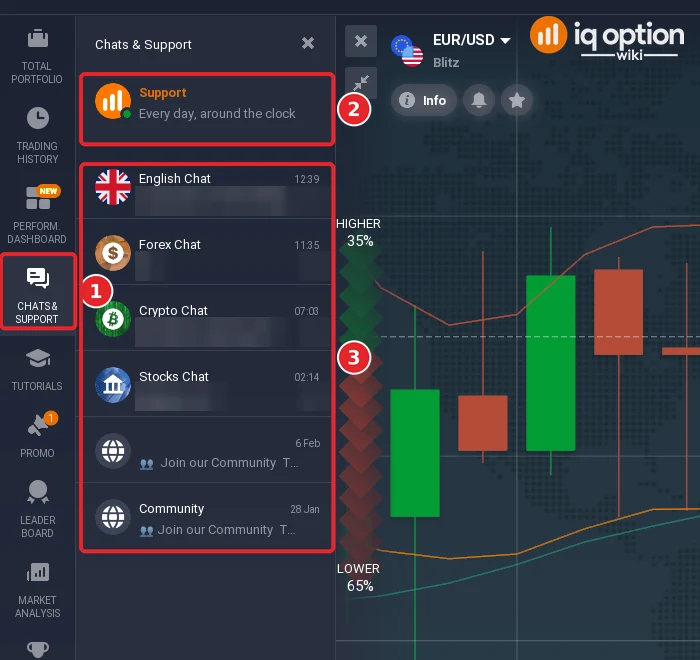
Click Chats & Support in the left sidebar (1). The panel opens with Support at the top (2), marked “Every day, around the clock”, and below it the chat rooms (3): English Chat, Forex Chat, Crypto Chat, Stocks Chat and two Community entries.
Step 2: Choose Support and write your message
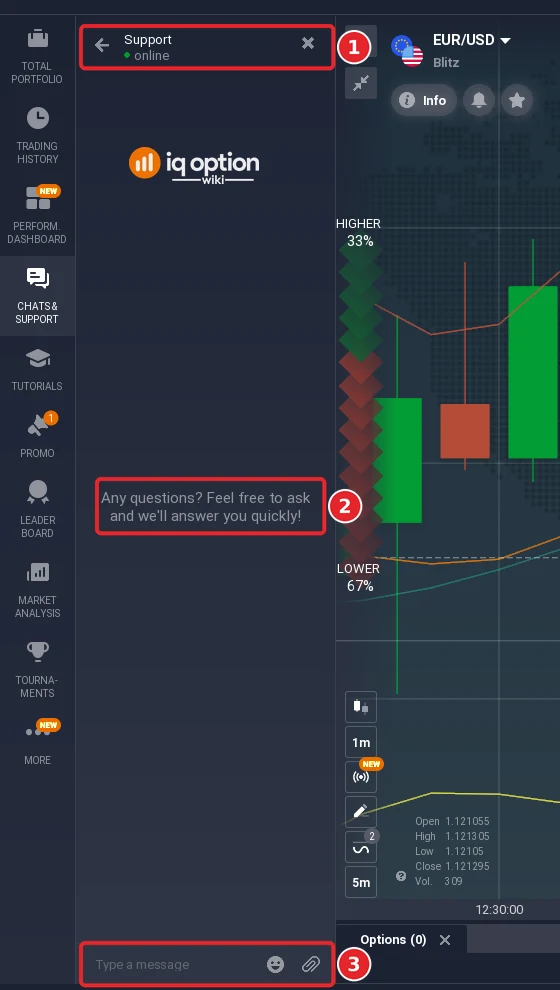
Click Support (1). The chat opens inside the platform with the status “online”. It reads “Any questions? Feel free to ask and we’ll answer you quickly!” (2), and a message field at the bottom (3) has an emoji button and an attachment button. Describe the problem in one message: what you did, what you saw, and which account email you use. We did not send a message.
The red Support button at the bottom left of the traderoom (1) opens the same chat. Next to it the footer shows support@iqoption.com (2) with the note “Every day, around the clock”.

Step 4: Write to support@iqoption.com when you cannot log in
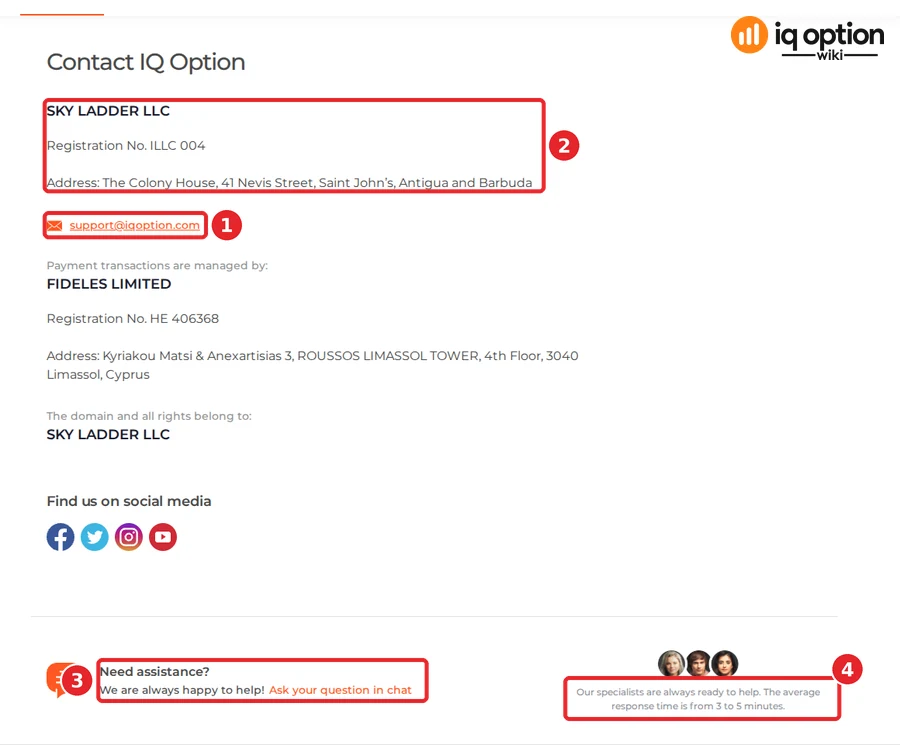
If you cannot open the traderoom, for example because your account is blocked, email support@iqoption.com (1) from the address you registered with. IQ Option’s blog says email is the better route for a complex case, for a blocked account, or when you want a written record, and that support usually replies within 24 hours. IQ Option’s contact page (About Us, Contact Us) also shows the company details (2), a link “Ask your question in chat” (3) and the line “Our specialists are always ready to help. The average response time is from 3 to 5 minutes.” (4). See why an IQ Option account gets blocked for what to write.
Step 5: Check the Help pages first
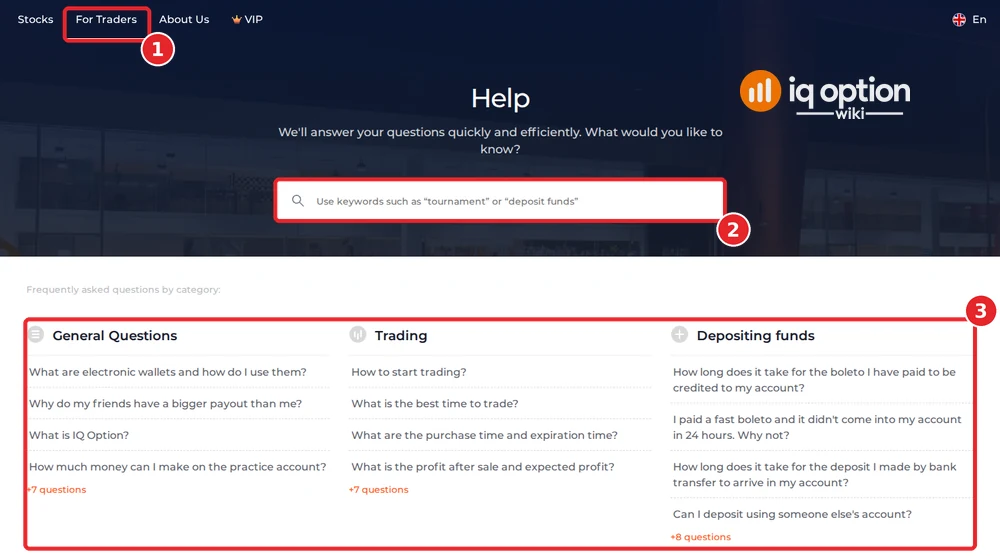
IQ Option’s blog recommends the Help page before you contact support. It covers deposits and withdrawals, fees, account setup and verification, and platform features. Open For Traders (1) in the top menu of the website and choose Help; use the search field (2) or browse the categories (3). Ours listed General Questions, Trading, Depositing funds, Withdrawing funds, Account and Verification. Help is at iqoption.com/en/faq.
Step 6: Use the complaints address if support does not solve it
IQ Option’s terms give a separate address for complaints, complaintsglobal@iqoption.com. IQ Option says it will acknowledge a complaint, start an internal investigation and respond within a reasonable time, given as within 3 months of acknowledging receipt (General Terms and Conditions, clause 7.1.c).
Social media
The blog also lists IQ Option’s accounts on Instagram, TikTok, YouTube and Facebook and a Telegram group, and says you can send a direct message there. Use only accounts linked from IQ Option’s own pages, and never send your password or documents in a direct message.
Who runs the platform
IQ Option’s contact page lists these companies and addresses (read on 5 October 2026):
| Role | Company and details |
|---|---|
| Operator of iqoption.com (the global platform) | SKY LADDER LLC, registration no. ILLC 004, The Colony House, 41 Nevis Street, Saint John’s, Antigua and Barbuda |
| Payment transactions | FIDELES LIMITED, registration no. HE 406368, Kyriakou Matsi & Anexartisias 3, Roussos Limassol Tower, 4th floor, 3040 Limassol, Cyprus |
| Domain and rights | SKY LADDER LLC |
| support@iqoption.com | |
| Phone | None listed |
Public chats: what they are and what the rules say
The other rooms in Chats & Support are chats between traders. IQ Option’s Help says that to take part in public chats you must “make at least one (1) deposit” and reach “a volume of $300”, so a new Practice account cannot post. The Chat Rules (updated 2 May 2025) prohibit, among other things:
- promoting or advertising services or products, and making financial or other deals in chats: the account of a user who does this “will be blocked permanently”;
- posting contact details and links to social media accounts, and requesting other users’ personal or trading account information;
- abusive language, insulting other users or moderators, and discussing political news and events;
- flooding, spamming and duplicate messages, links to third-party projects, and using another language than the one set for the chat.
Treat anyone who offers signals, “guaranteed” results or help with your account in a chat as a risk: IQ Option’s rules forbid the promotions and the contact details that such offers usually need. Never share your login, and never pay anyone who contacts you about your account. IQ Option lists its support channels as the live chat, support@iqoption.com and its official social media accounts. If you do not want your real name shown in chats, see the platform settings guide (Privacy) and the interface guide for the sidebar.
Frequently Asked Questions
Q: How can I contact IQ Option support?
A: Open Chats & Support in the traderoom and choose Support, press the red Support button at the bottom left, or email support@iqoption.com. IQ Option’s blog says support is available 24/7.
Q: Does IQ Option have a phone number?
A: No. IQ Option’s blog says it does not provide support by phone, and its contact page lists no phone number.
Q: How fast does support answer?
A: IQ Option’s contact page gives an average response time of 3 to 5 minutes for its specialists, and its blog says email usually gets a reply within 24 hours. We did not send a message, so we did not measure it.
Q: Can I use the chat on a Practice account?
A: You can open the support chat. IQ Option’s Help says taking part in public chats needs at least one deposit and a trading volume of $300.
Q: What can I do if my account is blocked and I cannot open the chat?
A: Email support@iqoption.com from the address you registered with. See why accounts are blocked.
Q: Where do I send a complaint?
A: To complaintsglobal@iqoption.com. The terms say IQ Option answers within a reasonable time, given as within 3 months of acknowledging receipt.
Q: Who operates iqoption.com?
A: SKY LADDER LLC, registered in Saint John’s, Antigua and Barbuda (no. ILLC 004). Payments are handled by FIDELES LIMITED in Cyprus.